
See the shared laundry plans
Check planned times and clearly labelled, self-reported use before heading to the laundry room. Each planning spot represents one washer and one dryer. Refresh to see neighbours’ latest changes.



See your neighbours’ laundry plans and share your own two-hour window.
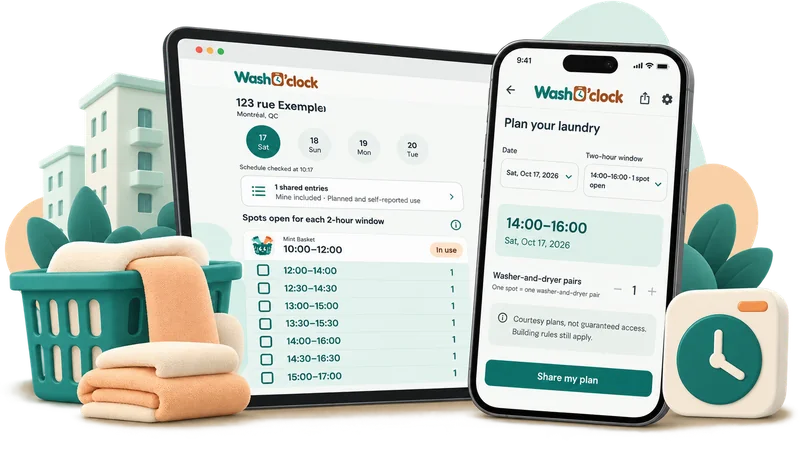
Find your building, check your neighbours’ plans, and share a two-hour window for the washer-and-dryer pairs you intend to use. Keep the schedule informed when your plans change.
Check planned times and clearly labelled, self-reported use before heading to the laundry room. Each planning spot represents one washer and one dryer. Refresh to see neighbours’ latest changes.

Choose a two-hour window and the number of washer-and-dryer pairs you intend to use. Edit or cancel your plan when things change. Courtesy plans help neighbours coordinate, but do not guarantee access.

Already doing laundry? Select “Using it now” to report your use, then “I’m finished” when you are done. These updates come from residents; the app does not monitor the machines.
Check your neighbours’ laundry plans and share yours, so there is something to consult before your next trip to the laundry room.
A practical way to share laundry plans, with optional email access and a browser experience that lets neighbours participate without installing an app.

Choose a laundry name and a preset avatar to get started. Email is optional for planning, and your real name is not required.

Give the people sharing your machines one place to see intended use and share their own plans, while keeping existing laundry-room rules in place.

Open your building’s schedule from a link or QR code. Installing the mobile app is optional, and the interface supports English and Canadian French.
Go from finding your building to sharing your plan in three steps.
Scan the laundry-room QR code, browse nearby buildings with optional location access, or search an address. If your building is missing, add it and confirm its washer and dryer counts.
Check the shared schedule, choose a planning window, and say how many washer-and-dryer pairs you intend to use.
Edit or cancel when your plans change. Report when you start using the machines and mark yourself finished when you are done.
Start with your building’s schedule in your browser, or download Wash O’clock for Android or iOS. Wash O’clock is free to use at launch.
Wash O’clock is a shared laundry planner for people using the same building’s washers and dryers. It shows neighbours’ plans and self-reported use so residents can coordinate beforehand.
No. Plans are courtesy notices, not exclusive reservations or guarantees of machine availability. Your building’s existing laundry-room rules still apply.
No email account is required to view the schedule or make a plan. To participate, choose a laundry name and a preset avatar. Verified email is optional for restoring access across devices and enabling email features.
No. You can use the shared schedule in your browser, including through a building-specific link or QR code.
Each plan covers two hours and includes the number of washer-and-dryer pairs you intend to use. This window does not describe actual machine cycle lengths or guarantee that every load will finish within two hours.
No. “In use” entries are reports from residents, not automatic machine detection. Refresh the schedule to see the latest reported changes.
Edit or cancel your plan when it changes. Select “Using it now” when you start and “I’m finished” when done. Finished use leaves the shared schedule and remains in your private laundry history.
Yes. Find or add your building, confirm its machine counts, and generate a QR flyer to display where permitted. The building should have one shared pool of machines used by the same community.
Wash O’clock is free to use at launch. Any fees charged for operating your building’s machines are separate and are not paid through Wash O’clock.